Virtual Map, the owner of streetdirectory.com , has made quite a good living enforcing their intellectual property rights against large and small companies in Singapore - when these companies used the unprotected jpg maps from streetdirectory.com, boom! they got threatened with a suit, and they'd settle out of court. And their licensing fees and `penalties' were not cheap. They succeeded against several parties, including the most famous case of all, NTUC! The fees were quite outrageous as I recall.
All the map data was licensed from SLA. They were trading in the license.
And SLA has started an action against Virtual Map, as reported by TODAY here. SLA states that it terminated their licensing to Virtual Map in July 2004.
Well, let's just see what happens. Virtual Map has only gotten hate from what I read in the papers the past few years, with their victims claiming entrapment, inducement, `making a living outta suing people', etc. Nothing flattering coming from the victims of course.
Well, let's see whether the SLA succeeds. If the SLA wins, Virtual Map might have to pay back all the license fees it collected from its clients since July 2004, with interest. Facts from the case and rulings might also put holes in Virtual Map's license even before July 2004, and the payback may extend even before July 2004.
After everything, their victims might hope that somebody might have the bright idea to allege that Virtual Map KNOWINGLY licensed their maps without having valid title.
Let the Discovery process reveal interesting internal emails! This will be fun to watch.
more blogs on this: Cnet Gin's Tonic
Friday, November 24, 2006


Saturday, November 18, 2006
Finally, Picasa can post to Blogger Beta
Since I upgraded my blogs to blogger beta in August, I've had nothing but problems when I try to post pictures to the blogs using Picasa. But I saw others with utterly no problems after the October Picasa patch which enabled dual logins to either Blogger or Blogger Beta.
Why? Because of this obscure point: If Backlinks are enabled in your Blogger beta blog (how's that for a tongue twister???), Picasa cannot post pictures there. Thanks to http://knownissues.blogspot.com/search/label/picasa :
Why? Because of this obscure point: If Backlinks are enabled in your Blogger beta blog (how's that for a tongue twister???), Picasa cannot post pictures there. Thanks to http://knownissues.blogspot.com/search/label/picasa :
You cannot post from Picasa to Blogger in beta if you have backlinks turned on.OK now that I've turned off the backlinks to my baby's blogs, the pictures come alive again!
Wednesday, November 15, 2006
Goosync syncs your cellphone with Google Calendar
 Goosync has made me the happiest man in the world today. The happiest! Really! How happy am I? Well, for the first time in my life, I've put an image at the centre of my blogpost! That's how happy I am.
The DREAM of synchronizing my cellphone with Google Calendar has almost been forgotten until today. I tried various ways of doing it, using the iCal specification, using various MAPI hacks with Outlook, sharing here and sharing there, and all of these either don't work or work with so much resource overhead, or have serious deficiencies.
FORGET ALL THAT NOW!
GOOSYNC ENABLES YOU TO SYNC YOUR CELLPHONE OVER THE AIR WITH GOOGLE CALENDAR!
Here's how it does it.
- Register at Goosync.
- Enter the normal crap, and then, they will want your google password. If you're afraid, do this.... make another google account (new google account), just for this, empty of everything, and share this new google account calendar with your normal google account or google hosted account. Then share your google hosted or normal google account with this new google account's calendar. So now it reads and writes both ways. This way, you'll protect your normal google account and any hacker who gets the new google account password is only limited to seeing your calendar, so that limits the damage. [Edit: Shared events don't seem to update anymore. Also, you can use your google hosted account by entering myname@domain.com at the username under Google Credentials.]
- Goosync will send you a SMS message with autoconfiguration code. Enter the password Goosync gives you and Accept the changes it contains.
- Then go to your cellphone's remote sync function, and run the goosync code, and you're synched both ways via GPRS, 3G GPRS or any damn internet connection your phone has.
Now, Google, please go buy Goosync. They've earned it. Just 5 million bucks. They've made me happier than you have. Goosync, I love you. I love you. I love you.
Monday, November 13, 2006
Soon: Synthetize a 3D environment using your pictures (and others')
Microsoft Photosynth is going to revolutionize the way you sort pictures. Right now you sort pictures according to your own tags, labels, or folders. Photosynth synthetizes a 3D environment based on the images in your pictures. Example: if you go to India, take pictures all around the Taj Mahal, Photosynth can arrange your images according to WHERE you took it around the Taj, in a 3D space, presumably merging with data available from the pictures of other people all around the Internet.
And this would add a further dimension to your pictures, much more than GPS geotagging. It will augment reality, give you a much more powerful view, and from a human point of view, evoke more intimate emotions about your pictures.
Check out the video here:
And this would add a further dimension to your pictures, much more than GPS geotagging. It will augment reality, give you a much more powerful view, and from a human point of view, evoke more intimate emotions about your pictures.
Check out the video here:
Tuesday, November 07, 2006
Thatcher's Advisor Debunks Assertions of Global Warming
Read here.
I've recently been greatly influenced by reports of global warming, not that I'm an expert, but it sure is intuitive that with all the heat pumped from our cars, factories etc. to the atmosphere, something bad's gonna happen. And Climate Change has become such an all-pervasive religion that I've scarcely heard any authoritative source.
So when a Thatcher fanboy like myself read Christopher Monckton's pop-science article at the Telegraph, it was something I wanted to spend a few minutes on. Read it yourself and judge.
I've recently been greatly influenced by reports of global warming, not that I'm an expert, but it sure is intuitive that with all the heat pumped from our cars, factories etc. to the atmosphere, something bad's gonna happen. And Climate Change has become such an all-pervasive religion that I've scarcely heard any authoritative source.
So when a Thatcher fanboy like myself read Christopher Monckton's pop-science article at the Telegraph, it was something I wanted to spend a few minutes on. Read it yourself and judge.
Thursday, September 21, 2006
Google Calendar now supports SMS in Singapore
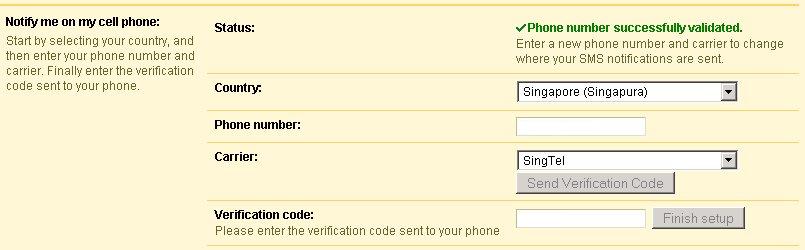 Google Calendar now supports SMS in Singapore and other countries! This is lovely! SMS notifications of events etc. FREE OF CHARGE.
This has been a long long awaited feature, now I'm investigating how the other Google services can use my cellphone. Stay tuned.
Wednesday, September 13, 2006
Vista Readyboost - FAT or NTFS, what flash drive to use ...
Vista features a caching technology called Readyboost, where, small files which take the hard disk drive a lot of time to read, are cached in a USB flash drive since USB flash drives have a far faster seek-time compared to Hard disk drives - yes, even Raptors.
There is a lot of talk on Readyboost on the web, but the details are lacking. After googling a bit, here's my take:
1) FAT or FAT32 or NTFS?
Though FAT and FAT32 use less CPU overhead, I thought that FAT would be fastest. Turns out to be not so... I guess it's because today's CPUs are so fast that the CPU overhead is nothing at all. Here're some experimenter data:
Test run #1 (without thumbdrive):
* Average boot time: 1:10m ~ 70s
Test run #2 (FAT32 formatted, 1840MB ReadyBoost swap file):
* Average boot time: 1:13m ~ 73s
Test run #3 (NTFS formatted, 1840MB ReadyBoost swap file):
* Average boot time: 1:05m ~ 65s

2) Format the USB drive at what sector or cluster size?
This is simple. If you have tons of small files, cluster size is an issue, since the smallest files which can be generated and stored is the size of the cluster. So if you have a 4KB cluster size, a 1KB file in fact would still take 4KB. Since Vista uses ONE HUGE FILE, just the default cluster size would be fine. Or any cluster size would be fine. The one detail I haven't worked out is `whether USB drives have a native cluster size'. Anybody can tell me this? I'd be grateful.
3) Which USB flash drive works?
I used the Imation Thumbdrive Micro 1GB, and it worked like a charm.
Discussion thread here, almost everything covered!
There is a lot of talk on Readyboost on the web, but the details are lacking. After googling a bit, here's my take:
1) FAT or FAT32 or NTFS?
Though FAT and FAT32 use less CPU overhead, I thought that FAT would be fastest. Turns out to be not so... I guess it's because today's CPUs are so fast that the CPU overhead is nothing at all. Here're some experimenter data:
Test run #1 (without thumbdrive):
* Average boot time: 1:10m ~ 70s
Test run #2 (FAT32 formatted, 1840MB ReadyBoost swap file):
* Average boot time: 1:13m ~ 73s
Test run #3 (NTFS formatted, 1840MB ReadyBoost swap file):
* Average boot time: 1:05m ~ 65s
2) Format the USB drive at what sector or cluster size?
This is simple. If you have tons of small files, cluster size is an issue, since the smallest files which can be generated and stored is the size of the cluster. So if you have a 4KB cluster size, a 1KB file in fact would still take 4KB. Since Vista uses ONE HUGE FILE, just the default cluster size would be fine. Or any cluster size would be fine. The one detail I haven't worked out is `whether USB drives have a native cluster size'. Anybody can tell me this? I'd be grateful.
3) Which USB flash drive works?
I used the Imation Thumbdrive Micro 1GB, and it worked like a charm.
Discussion thread here, almost everything covered!
Vista RC1 Keys available from Microsoft
Microsoft released Vista RC1 for public download, but did not give the keys. At this time, the official position was that only beta2 testers could get Vista RC1 working.
After googling a bit, I found that Microsoft left a backdoor for us to get the keys even though we are not beta2 guys....
procedure to get beta2 keys:
http://www.jkg.in/34-how-to-obtain-the-windows-vista-beta-2-key-serial-for-free.htm
Edit: Arrgh I think the link above is dead, I have dragged the following code from the depths of my desktop cache, hope it works:
Select your country and click the button labelled ‘Go’ or try using the form here:
(please click on the country selector. The country selector is the backdoor. Do not go to the microsoft homepage, coz it's changed)
YOu can now download vista http://download.windowsvista.com/preview/rc1/en/download.htm
Until July 07 then deactivate. I tested keys, all activated Vista without problems, to get ultimate edition.
Enjoy!
After googling a bit, I found that Microsoft left a backdoor for us to get the keys even though we are not beta2 guys....
procedure to get beta2 keys:
http://www.jkg.in/34-how-to-obtain-the-windows-vista-beta-2-key-serial-for-free.htm
Edit: Arrgh I think the link above is dead, I have dragged the following code from the depths of my desktop cache, hope it works:
(please click on the country selector. The country selector is the backdoor. Do not go to the microsoft homepage, coz it's changed)
YOu can now download vista http://download.windowsvista.com/preview/rc1/en/download.htm
Until July 07 then deactivate. I tested keys, all activated Vista without problems, to get ultimate edition.
Enjoy!
Get More Bandwidth by using a better Cable splitter
 Thanks to the thread in here: the threadstarter found that his cable splitter was rusty, and changed it with positive results - more bandwidth.
That got a discussion going. And sent me shopping. Here's what I found.
Most cable splitters have these attributes:
- Frequency: the best are 0-1000Mhz, but what I could easily find was 5-1000MHz.
- dB loss: Signal loss for 1-Split-2 and 1-Split-3 is 3dB, but Signal loss for 1-Split-4 is 7dB.
- Isolation: some of the splitters have electromagnetic noise isolation, ranges from 80-120dB, I bought the 120dB one.
To achieve a 4 way split, it is advisable to get a 3 way splitter together with a 2 way splitter, rather than to get a 4 way splitter.My results? I'm happier with my optimized connection than before. It's little trouble, so doing it gives you peace of mind and at least a psychological boost.
4 way splitter will result in at least a 7dB drop in RF signal stregnth to each of the 4 taps. By using a 3 way spliiter, you at least get 2 taps with a 3.5dB drop. My recommendation is to connect your modem to one of the 3.5dB tap, and connect the 2 way splitter to the other 3.5bB tap, together achieveing a 4 way split.
Saturday, August 26, 2006
Starhub changes HDTV programming

After being subjected to months of old World Cup matches, finally Starhub is showing samples of DiscoveryHD and National Geographic HD. And they look BEAUTIFUL.
Using the power of Blogger Beta

From a `user' of blogging technology and not really a power blogger geek, Blogger Beta's new features are a god-send. I especially like the enhanced way that archived posts are presented in the javascript applet on the sidebar. And the organization of the page elements enable code to be put into a neat little box in authoring mode, makes things so much more clean and configurable.
Here we are - the Tech-Biased Perspective in a new look.
Wednesday, August 16, 2006
MDA has some HDTV-related events coming up soon
Just received an email from the MDA a few minutes ago. Here it is ad-verbatim.
Dear Sir/Mdm,
UPCOMING HDTV EVENTS
Keen to learn more about High Definition (HD) Technology? Want to experiance HD broadcasting?
We've got several interesting events that you can attend in August to discover more on HDTV and the benefits it offer. You can walk away with exclusive HDTV premiums or even stand a chance to win a 26” HD-Ready LCD TV. Read on for details!
A. Exhibitions:
1. HDTV Mobile Exhibition
Date: 8 Aug to 31 Aug
Venue: Level 1, Tampines Regional Library
Discover the difference between High Definition and Analogue signals at our ongoing exhibition at the regional library outlets. Visitors stand to receive an exclusive HDTV premium when they complete a simple survey form.
2. Evolution of TV: Getting You Ready for HD
Date: 10 Aug to 31 Aug
Venue: Level 7, Lee Kong Chian Reference Library, National Library Board Building
Organized by Sony Singapore and supported by the MDA and NLB
Experience the evolution of television technology from the first black and white sets to today’s state-of-the-art systems. Visitors stand to win a 26” HD-Ready LCD TV from Sony worth $1,599.
B. Talks:
1. Demystifying HD & Setting up a complete HD Cinema
Date: 19 Aug, 20 Aug
Venue: Changi/ Simei Room, Level 3, Tampines Regional Library
Presented by Snazio
Demystifying HD & Setting up a complete HD Cinema
Discover the myths and realities of High-Definition (HD) technology and the various ways you can enjoy HD-quality entertainment.
Time:
Date: 19 Aug
1.00pm - 1.30pm – Demystifying HD
1.30pm - 2.00pm – Setting up a complete HD Cinema
5.00pm - 5.30pm - Demystifying HD
5.30pm - 6.00pm - Setting up a complete HD Cinema
Date: 20 Aug
1.00pm - 1.30pm – Demystifying HD
1.30pm - 2.00pm – Setting up a complete HD Cinema
2. The Big Picture & Demystifying HD
Date: 27 Aug
Venue: Changi/ Simei Room, Level 3, Tampines Regional Library
The Big Picture presented by Chi Mei
High Definition TV (HDTV) broadcasts are on the way! What kind of television will bring the richness of multimedia into your living room…now and into the future?
Demystifying HD presented by Snazio
Discover the myths and realities of High-Definition (HD) technology and the various ways you can enjoy HD-quality entertainment.
Time:
1.00pm - 1.30pm - The Big Picture
1.30pm - 2.00pm - Demystifying HD
5.00pm - 5.30pm - The Big Picture
5.30pm - 6.00pm - Demystifying HD
Admission is free to all events.
For more updates, please visit www.hdtv-trial.sg for the latest HDTV developments and happenings.
See you there!
Best Regards
Community & International Relations
Media Development Authority
Dear Sir/Mdm,
UPCOMING HDTV EVENTS
Keen to learn more about High Definition (HD) Technology? Want to experiance HD broadcasting?
We've got several interesting events that you can attend in August to discover more on HDTV and the benefits it offer. You can walk away with exclusive HDTV premiums or even stand a chance to win a 26” HD-Ready LCD TV. Read on for details!
A. Exhibitions:
1. HDTV Mobile Exhibition
Date: 8 Aug to 31 Aug
Venue: Level 1, Tampines Regional Library
Discover the difference between High Definition and Analogue signals at our ongoing exhibition at the regional library outlets. Visitors stand to receive an exclusive HDTV premium when they complete a simple survey form.
2. Evolution of TV: Getting You Ready for HD
Date: 10 Aug to 31 Aug
Venue: Level 7, Lee Kong Chian Reference Library, National Library Board Building
Organized by Sony Singapore and supported by the MDA and NLB
Experience the evolution of television technology from the first black and white sets to today’s state-of-the-art systems. Visitors stand to win a 26” HD-Ready LCD TV from Sony worth $1,599.
B. Talks:
1. Demystifying HD & Setting up a complete HD Cinema
Date: 19 Aug, 20 Aug
Venue: Changi/ Simei Room, Level 3, Tampines Regional Library
Presented by Snazio
Demystifying HD & Setting up a complete HD Cinema
Discover the myths and realities of High-Definition (HD) technology and the various ways you can enjoy HD-quality entertainment.
Time:
Date: 19 Aug
1.00pm - 1.30pm – Demystifying HD
1.30pm - 2.00pm – Setting up a complete HD Cinema
5.00pm - 5.30pm - Demystifying HD
5.30pm - 6.00pm - Setting up a complete HD Cinema
Date: 20 Aug
1.00pm - 1.30pm – Demystifying HD
1.30pm - 2.00pm – Setting up a complete HD Cinema
2. The Big Picture & Demystifying HD
Date: 27 Aug
Venue: Changi/ Simei Room, Level 3, Tampines Regional Library
The Big Picture presented by Chi Mei
High Definition TV (HDTV) broadcasts are on the way! What kind of television will bring the richness of multimedia into your living room…now and into the future?
Demystifying HD presented by Snazio
Discover the myths and realities of High-Definition (HD) technology and the various ways you can enjoy HD-quality entertainment.
Time:
1.00pm - 1.30pm - The Big Picture
1.30pm - 2.00pm - Demystifying HD
5.00pm - 5.30pm - The Big Picture
5.30pm - 6.00pm - Demystifying HD
Admission is free to all events.
For more updates, please visit www.hdtv-trial.sg for the latest HDTV developments and happenings.
See you there!
Best Regards
Community & International Relations
Media Development Authority
Tuesday, August 15, 2006
Starhub Maxonline Blocks Port 80 incoming
This summary is not available. Please
click here to view the post.
Friday, July 28, 2006
The Human Mind vs the mindless march of technology
 Check out Cnet's special feature on the ten year old Apple Newton vs the brand new Samsung Q1 UMPC. The Apple Newton wins. Surprise... yeah.
The human mind, if intensely focussed towards creating something bespoke, in this case, a Newton handheld PC, vs taking a mishmash of technology, none of them bespoke, and concentrating on the off the shelf components and trying to keep costs down, it's no surprise:
When a human mind is dedicated towards the creation of a handheld PC, SPECIFICALLY, without heed to cost nor uniformity nor UI conformity nor anything else, the result can surpass 10 years of technology advancement.
Samsung shouldn't be embarassed, being in this case the glorified mindless manufacturer. But Microsoft should be, with their billions at their disposal, and 10 years of standing on the shoulders of giants, and yet not being able even to create an OS interface and subsidiary technologies to approximate the decade-old Newton.
When is this mindlessness going to stop, Microsoft? I'm tired of it.
Monday, July 24, 2006
Creative - watcha gonna do?
 Here's a best guess report on the new Microsoft Zune Ipod killer. Seems to be a Microsoft branded product. While not detracting from the Ipod, it looks cool in a bland sort of way.
It's boring, period. The only thing left to speak about, is - what about those guys who used Microsoft middleware and software to make their own Ipod killers? Especially Creative - what are you gonna do now that Microsoft is rolling out their own branded PMPs?
Be a contract manufacturer for Micorosoft? Not a bad idea though, considering the quantum of success Creative's had with their own brands.
Wednesday, July 19, 2006
JAJAH - free phone to phone, anywhere, any phone

Just take a look at http://jajah.com
Finally, phone to phone conversations, potentially free, between any phone anywhere in the world. All you have to do is to register your phone numbers at Jajah, access a web page, key in your call receipient's phone number, and press call. Phone to phone VOIP, simply!
`Potentially free' is because it's only free if your receipient's phone number is also registered with Jajah. But this isn't an issue. You could simply register your `computer blind' friends with Jajah using other email addresses under your name, and their numbers are registered, not strictly correctly, but sufficient to make free calls to them.
And you can SMS too, through the browser, but at US$0.045 per SMS, even between registered users, I think there're cheaper solutions elsewhere.
So, what if you're out without a computer? Shouldn't be a problem, if your mobile phone has a web browser. I faced issues though, accessing the Jajah webpage gave me parsing errors on my Sony Ericsson M600 phone browser (Opera 8.6). Will be looking for a solution.
In the meantime, just call away.
Update: The thing is that Jajah checks your IP, determines the network location, then fixes your country code. So this limits you to some extent if you try to register for people outside your country. Some countries (specifically Malaysia) have a problem - they can't register. Perhaps Jajah withdrew support for Malaysia.
For the lucky ones in free countries, my M600 is working now, with Opera Mini 2.0, downloadable from http://mini.opera.com
Monday, July 17, 2006
New Firmware released for Starhub's ADB 3800C box
New Firmware for Starhub ADB 3800C box was released last week. After updating, the audio dropout issue has not been rearing its head so far. I'm monitoring and will keep you posted.
Update: I've monitored, the dropout issue is less, but yet, still occurs.
Update: I've monitored, the dropout issue is less, but yet, still occurs.
Wednesday, July 12, 2006
TVUplayer - Peer to peer streaming playback
Imagine a video player, with the capability to suck streaming video from your peers, connected to all the broadcasters of the world. Broadcasters will not need to have huge fat connections as feeds will, after the initial seed is planted in a peer, be fed peer to peer without needing any more service from the broadcaster itself. Stuff of nerd utopia?
Well, this is now reality. TVUnetworks is offering such a player, in beta, for free. How he handles the legality, I don't know. It seems to be legal. He is open to the world, even his address is available. The World Cup was rebroadcasted to tens of thousands using this technology.
What does this mean? The quality is excellent, with a 100kB/s total feed from 15 peers, we have better than Starhub SD quality. Do cable operators have to move up to HD totally just to escape TVUnetworks and its brethen? Even then, there is no theoretical limit to the delivery capability of peer-to-peer streaming. Even 6Mbit/s HD can be delivered now if the upstream datarate in a region is good. With Docsis 3 bonding, wow, we'll have even less limits.
What is sure, is that Slingbox is dead. TVUplayer does not need any configuration, any hardware, etc. Any broadcaster wanting to go it alone, like Mediacorp's Mobtv.sg better review their business plan, perhaps to work with TUVnetworks, solving all their bandwidth issues.
Incredible stuff. I'll keep you guys posted. Now for HBO on TVUplayer.
Well, this is now reality. TVUnetworks is offering such a player, in beta, for free. How he handles the legality, I don't know. It seems to be legal. He is open to the world, even his address is available. The World Cup was rebroadcasted to tens of thousands using this technology.
What does this mean? The quality is excellent, with a 100kB/s total feed from 15 peers, we have better than Starhub SD quality. Do cable operators have to move up to HD totally just to escape TVUnetworks and its brethen? Even then, there is no theoretical limit to the delivery capability of peer-to-peer streaming. Even 6Mbit/s HD can be delivered now if the upstream datarate in a region is good. With Docsis 3 bonding, wow, we'll have even less limits.
What is sure, is that Slingbox is dead. TVUplayer does not need any configuration, any hardware, etc. Any broadcaster wanting to go it alone, like Mediacorp's Mobtv.sg better review their business plan, perhaps to work with TUVnetworks, solving all their bandwidth issues.
Incredible stuff. I'll keep you guys posted. Now for HBO on TVUplayer.
Tuesday, July 11, 2006
Audio Dropouts - ADB 3800C HDMI
Since the very beginning of the Starhub HD trial, I faced an audio dropout issue. Every few minutes, the audio would drop for 2 seconds or so, then resume. After the single firmware upgrade available, I still face the audio dropout problem, but less. This problem occurs in HD, and SD channels too. Just to clarify, this issue ONLY happens for me if I use HDMI audio. I did not try the AC3 out - but the stereo jacks don't give the issue.
The last time I faced such an issue with digital video, in digital video editing, this is the problem - I'm not saying that the SCV HDMI audio dropout problem is exactly this problem, but perhaps the problem I faced years ago can raise some ideas on how to troubleshoot among the SCV people.
The old steadfast Sony M1 DV codec chip used in some video editing systems, supports a standard called 'locked audio' in DVCAM systems. In locked audio format, the audio output must be set to exactly 32032hz per second, otherwise the chip will not accept the audio in sync. The Sony consumer DV cameras are also designed to record/output audio in and around that frequency, averaging around 32032hz for every second.
However, in the Canon XL1 the audio frequency changed heavily for every second, sometimes with differences of more than 20 to 30hz between seconds. This caused the average audio frequency was around 32053hz for every seconds. When Canon 32053hz audio mixed with Sony 32032hz audio, in a video editing system using the Sony M1 DV codec chip, the audio sync will be way off, and unusable. The symptom is EXACTLY what I see in the Starhub HDMI audio - dropouts at irregular intervals. I remember the dropouts very well, the resemblance is uncanny. The dropouts will happen once the sync goes to hell and the audio buffers reach their limit, the chip will try to flush the buffers to reset the sync, causing an audio dropout in the process.
The solution: When capturing, the video editing system will look at the first second (store it in the buffer) and measure the sampling rate, and if that sampling rate was outside the range of 32026hz to 32038hz, the editing system will consider the camera as an XL1 and capture audio as 32053hz per second. After sampling as 32053hz per second, it will convert the audio to 48048hz, and then convert back to 32032hz, to create an .AVI file. This is to create an .AVI file that is compatible with other cameras.
Credit to Charles Burmeister in DVinfo.net in jogging my memory.
What this means to Starhub broadcasts, is that the sampling rate of the audio streams broadcasted by Starhub's DVB-C system, may be `slightly' out of the max and min parameters which the set top box's HDMI transmitter can handle. OR, the ADB 3800C box does internal audio conversion (HDMI stage), and outputs the audio via the HDMI which sampling rate are out of the min or max parameters of the TV's audio system can take, again causing a sync issue. Or both, of course. Both ways, it points to the HDMI transmitter chip - since stereo jacks don't have an issue. I've yet to experiment with the AC3 optical out, but Starhub guys can do that, I don't have time for that now.
Because the sampling rate may not be fixed, this will create dropouts not at regular intervals, but irregular intervals. It can range from hours without a dropout issue, or just 30 to 40 seconds.
Starhub officials who see this, may it give you a little idea on how to fix it. Worst is that the ADB box has a stability issue with the system clocks.
If it is indeed an audio sampling issue, the following problems can be eliminated:
1) TV's AC3 decoder problems - cannot be, because everybody here have different TV, and most experience the issue. Anyway, our TVs work fine with the AC3 output from our HDMI DVD players.
2) Source video issues - cannot be. All your source is like that. Worse, I am experiencing lipsync issues with your mediacorp content! Which I did not experience with the old Digital set top box or analog set top box.
3) Cable issues - cannot be. I used 3-4 different HDMI cables already.
4) Signal Strength - Nah. I have 100% quality with very low Biterror rate according to the Starhub contractor.
It might be a HDMI transmitter issue (most probably Silicon Image)... other devices have this issue also: see http://forum.ecoustics.com/bbs/messages/2/162876.html
Anyway, over to you, Starhub.
Edit: With more research, so many similar problems on the net, just search for `HDMI audio dropout' in google. I am indeed quite convinced that the HDMI transmitter chip on the ADB 3800C has some issues. Refer to this link here for best evidence. I quote:
And I urge Starhub to try with AC3 out (optic) and see whether you have the same issue or not. I would expect that the AC3 out has no issues. If so, wham, you got your culprit - the HDMI transmitter.
The last time I faced such an issue with digital video, in digital video editing, this is the problem - I'm not saying that the SCV HDMI audio dropout problem is exactly this problem, but perhaps the problem I faced years ago can raise some ideas on how to troubleshoot among the SCV people.
The old steadfast Sony M1 DV codec chip used in some video editing systems, supports a standard called 'locked audio' in DVCAM systems. In locked audio format, the audio output must be set to exactly 32032hz per second, otherwise the chip will not accept the audio in sync. The Sony consumer DV cameras are also designed to record/output audio in and around that frequency, averaging around 32032hz for every second.
However, in the Canon XL1 the audio frequency changed heavily for every second, sometimes with differences of more than 20 to 30hz between seconds. This caused the average audio frequency was around 32053hz for every seconds. When Canon 32053hz audio mixed with Sony 32032hz audio, in a video editing system using the Sony M1 DV codec chip, the audio sync will be way off, and unusable. The symptom is EXACTLY what I see in the Starhub HDMI audio - dropouts at irregular intervals. I remember the dropouts very well, the resemblance is uncanny. The dropouts will happen once the sync goes to hell and the audio buffers reach their limit, the chip will try to flush the buffers to reset the sync, causing an audio dropout in the process.
The solution: When capturing, the video editing system will look at the first second (store it in the buffer) and measure the sampling rate, and if that sampling rate was outside the range of 32026hz to 32038hz, the editing system will consider the camera as an XL1 and capture audio as 32053hz per second. After sampling as 32053hz per second, it will convert the audio to 48048hz, and then convert back to 32032hz, to create an .AVI file. This is to create an .AVI file that is compatible with other cameras.
Credit to Charles Burmeister in DVinfo.net in jogging my memory.
What this means to Starhub broadcasts, is that the sampling rate of the audio streams broadcasted by Starhub's DVB-C system, may be `slightly' out of the max and min parameters which the set top box's HDMI transmitter can handle. OR, the ADB 3800C box does internal audio conversion (HDMI stage), and outputs the audio via the HDMI which sampling rate are out of the min or max parameters of the TV's audio system can take, again causing a sync issue. Or both, of course. Both ways, it points to the HDMI transmitter chip - since stereo jacks don't have an issue. I've yet to experiment with the AC3 optical out, but Starhub guys can do that, I don't have time for that now.
Because the sampling rate may not be fixed, this will create dropouts not at regular intervals, but irregular intervals. It can range from hours without a dropout issue, or just 30 to 40 seconds.
Starhub officials who see this, may it give you a little idea on how to fix it. Worst is that the ADB box has a stability issue with the system clocks.
If it is indeed an audio sampling issue, the following problems can be eliminated:
1) TV's AC3 decoder problems - cannot be, because everybody here have different TV, and most experience the issue. Anyway, our TVs work fine with the AC3 output from our HDMI DVD players.
2) Source video issues - cannot be. All your source is like that. Worse, I am experiencing lipsync issues with your mediacorp content! Which I did not experience with the old Digital set top box or analog set top box.
3) Cable issues - cannot be. I used 3-4 different HDMI cables already.
4) Signal Strength - Nah. I have 100% quality with very low Biterror rate according to the Starhub contractor.
It might be a HDMI transmitter issue (most probably Silicon Image)... other devices have this issue also: see http://forum.ecoustics.com/bbs/messages/2/162876.html
Anyway, over to you, Starhub.
Edit: With more research, so many similar problems on the net, just search for `HDMI audio dropout' in google. I am indeed quite convinced that the HDMI transmitter chip on the ADB 3800C has some issues. Refer to this link here for best evidence. I quote:
Observation; audio would drop every few seconds and "digital" would blink on amp indicating no optical sync at all. Each time audio would come back there would be a slight glitch in a part of the picture as well. Appears to have been recorded this way as I could replay the problem.So every audio drop, optic sync is `gone'. The HDMI transmitter is probably emptying its buffers. Then the sync comes back. C'mon, this is a good lead for the troubleshooting!
And I urge Starhub to try with AC3 out (optic) and see whether you have the same issue or not. I would expect that the AC3 out has no issues. If so, wham, you got your culprit - the HDMI transmitter.
Friday, July 07, 2006
Removal of Mr. Brown link
I've had a Mr. Brown link since the Te Kwa days in my small collection of links. I'm removing Mr. Brown's link at this time. I'm disturbed by the implications of Mr. Brown's act of censorship of certain comments in a his comments page where hundreds of people are commenting on the lack of free speech.
Thursday, July 06, 2006
mrbrown `Today' column suspended
This has nothing to do with tech.
I don't give much heed to what mrbrown says, as his issues don't concern me much. But he sure is funny. Since I like TRANSPARENCY, and since the entity which suspended him is a newspaper, and since a few thousand people visit this blog, just be informed of the suspension. Original here: http://www.mrbrown.com/blog/2006/07/regarding_today.html
Edit 6pm 7 July 2006: Also in the interests of TRANSPARENCY, I declare that at least 1 comment, by a user who calls himself IRCTP, who posted some comments not in line with that of most of the other commenters on the `regarding today' blogpost, was deleted by mrbrown at or around 5.45 pm today. To be clear, Mr. Brown has a right to delete that blogpost as he controls the site. It shows that in certain circumstances, he does not feel that open debate is the best thing.
I don't give much heed to what mrbrown says, as his issues don't concern me much. But he sure is funny. Since I like TRANSPARENCY, and since the entity which suspended him is a newspaper, and since a few thousand people visit this blog, just be informed of the suspension. Original here: http://www.mrbrown.com/blog/2006/07/regarding_today.html
Edit 6pm 7 July 2006: Also in the interests of TRANSPARENCY, I declare that at least 1 comment, by a user who calls himself IRCTP, who posted some comments not in line with that of most of the other commenters on the `regarding today' blogpost, was deleted by mrbrown at or around 5.45 pm today. To be clear, Mr. Brown has a right to delete that blogpost as he controls the site. It shows that in certain circumstances, he does not feel that open debate is the best thing.
Which is similar to the reputed government behaviour of course.
While I am not endorsing any censorship, I merely with to put on record and public view the act of deletion - which he did without notification or explanation.
Tuesday, June 27, 2006
More Support for Progressive HD tranmissions
My letter to MDA chief for HD has not yet been answered. Anyway, here's something I came across while doing some other research in my line of work.
EBU recommendation for a progressive approach to HD in Europe
I'll write more about it soon. In any case, the EBU supports HD transmissions in Progressive, and gives well weighted reasons for it. Take a look yourself.
Excerpt:
EBU recommendation for a progressive approach to HD in Europe
I'll write more about it soon. In any case, the EBU supports HD transmissions in Progressive, and gives well weighted reasons for it. Take a look yourself.
Excerpt:
EBU Project Group B/TQE looked objectively at the technical case for retaining interlaced scanning or using progressive scanning. Although it may be surprising, the group has not been able to find technical arguments to support the continued use of interlaced scanning in the circumstances being considered. These are the delivery of new HD services to progressively scanned receivers, in an environment where advanced bitrate reduction is available. The technical arguments that we have found come down in favour of progressive scanning.If any of this means anything to you, you could drop an email to the MDA chief of the HD programme: yeo_chun_cheng@mda.gov.sg Do it before it's too late. We stand at the cusp of HD adoption in Singapore. If we are too late, we will never be able to do the right thing. For those who came in late, MDA has announced that they will standardize on an interlaced 1080i format as reported in the Straits Times. It may be a wrong decision, and one should let the government reconsider or at least address this question. After all, it is taxpayers' money, and I am a taxpayer and so may you be.
powered by performancing firefox
Why Wimbledon HD not shown through Starhub?
The Wimbledon championships is yet another golden platform to show off Starhub's new HD service.
http://www.tvtechnology.com/features/news/2006.06.14-n_BBC.shtml
WHY IN THE WORLD is Starhub not showing Wimbledon HD during our Starhub trials? The content is already licensed from ESPN, does it cost so much extra to put it into channel 300 or 301???
http://www.tvtechnology.com/features/news/2006.06.14-n_BBC.shtml
WHY IN THE WORLD is Starhub not showing Wimbledon HD during our Starhub trials? The content is already licensed from ESPN, does it cost so much extra to put it into channel 300 or 301???
Toshiba's HD-DVD player is a PC!

Actually, Toshiba's first HD-DVD player is actually a .... PC! Isuppli tore down a player, and the secret's out!
http://www.eetimes.com/rss/showArticle.jhtml?articleID=189600999
It's an Intel PC with 1GB memory and tons of other subsidiary chips.
This is why I say, this year, the HTPC is really gonna boom! Even Toshiba has bowed to the power and flexibility of a PC.
When are you gonna get a HTPC? Abit can supply you a HDMI motherboard real soon for the new Conroe chips. I'll probably build a expandable, customizable ultra high quality HTPC as soon as Conroe ships.
Friday, June 23, 2006
Hands Off the Internet
This is an animated cartoon about the future of the Internet:
http://www.internetofthefuture.org/
This site set up obviously by telcos or a group of telcos, hosted at 1and1.com. The summary of it - Telcos who spend lots of cash to put in more bandwidth, want to segment the bandwidth to `premium' bandwidth and `normal' bandwidth, where presumably the premium bandwidth will be more expensive but offer assured service levels. But te US Congress wants `net neutrality' - and if the US Congress gets what it wants, it will be illegal for any company to segment bandwidth this way at least within the US.
This affects us. What is illegal in the US will mean that we don't get the technology to do all this in Asia. And we probably can't depend on Europe.
To me, hey, more power to you, big business. Do what you want. Let the public decide.
Nobody knows the business as well as business. And I believe that free market Competition will suffice to act as a check and balance against overcharging.
Obviously not what the commies at The Register believe ... to hell with questioning the justifications. If Big Business wants to charge more, so be it. Why has our faith in the invisible hand of the free market wavered so far???
Let's put it this way - if government wants to control, they probably gotta pay (unless they put a gun to the telco's head, and I believe the USA has not reached this desperate situation, yet) and if government pays, it's the public money. If the government of the USA decides to pay for it, it might create a dangerous precedent for OUR government. And I'd really rather not pay since I really don't use that much bandwidth. Look, just a thousand or so visitors to this blog (which is in the USA) don't take as much bandwidth as Mr. Brown's 50K visitors! Let Mr. Brown pay!
http://www.internetofthefuture.org/
This site set up obviously by telcos or a group of telcos, hosted at 1and1.com. The summary of it - Telcos who spend lots of cash to put in more bandwidth, want to segment the bandwidth to `premium' bandwidth and `normal' bandwidth, where presumably the premium bandwidth will be more expensive but offer assured service levels. But te US Congress wants `net neutrality' - and if the US Congress gets what it wants, it will be illegal for any company to segment bandwidth this way at least within the US.
This affects us. What is illegal in the US will mean that we don't get the technology to do all this in Asia. And we probably can't depend on Europe.
To me, hey, more power to you, big business. Do what you want. Let the public decide.
Nobody knows the business as well as business. And I believe that free market Competition will suffice to act as a check and balance against overcharging.
Obviously not what the commies at The Register believe ... to hell with questioning the justifications. If Big Business wants to charge more, so be it. Why has our faith in the invisible hand of the free market wavered so far???
Let's put it this way - if government wants to control, they probably gotta pay (unless they put a gun to the telco's head, and I believe the USA has not reached this desperate situation, yet) and if government pays, it's the public money. If the government of the USA decides to pay for it, it might create a dangerous precedent for OUR government. And I'd really rather not pay since I really don't use that much bandwidth. Look, just a thousand or so visitors to this blog (which is in the USA) don't take as much bandwidth as Mr. Brown's 50K visitors! Let Mr. Brown pay!
Conroe - the new King?
Yesterday, I was invited to the Intel Channel Conference held at The Legend at Fort Canning Park, as one of the small-time speakers.
The most interesting thing at that event, was that Intel commissioned Terence from VR-Zone to build 2 systems based on the $1600 AMD FX62 and the top end Intel Core2Duo (at around the same price). No other constraints, according to Terence. He tried his best for both, and the sysconfig only differed from the motherboard chipset and CPU. The AMD system used a nForce5 chipset and the Intel system used a 975 chipset, all other things equal. No overclocking was allowed, everything ran at stock speed. Various benchmarks were prepared, but 2 were used - MPEG encoding and a Half Life Timedemo.
In both the tests, the Conroe system beat the FX62 by a margin of about 40%.
Seems now that it is indisputable that the Conroe is king for now. Until next year, that is.
The most interesting thing at that event, was that Intel commissioned Terence from VR-Zone to build 2 systems based on the $1600 AMD FX62 and the top end Intel Core2Duo (at around the same price). No other constraints, according to Terence. He tried his best for both, and the sysconfig only differed from the motherboard chipset and CPU. The AMD system used a nForce5 chipset and the Intel system used a 975 chipset, all other things equal. No overclocking was allowed, everything ran at stock speed. Various benchmarks were prepared, but 2 were used - MPEG encoding and a Half Life Timedemo.
In both the tests, the Conroe system beat the FX62 by a margin of about 40%.
Seems now that it is indisputable that the Conroe is king for now. Until next year, that is.
HDMI version 1.3 finalized and published
Reported in The Register today that the HDMI version 1.3 specification has been finalized and published. If you buy a HDMI v1.3 device today, you will not face some of the `unanswered issues' for audio which I discussed in my other blogpost HDTV in Singapore - which is, how will HDMI 1.1 or 1.2 support Dolby Digital Plus and DTS HD, which are contained in the newest releases for HD-DVD or Blu-Ray discs, which can easily be supported by both 1.1 or 1.2 but is disallowed by the licensing authority.
That being said, WHY in the world they screwed the early adopters of HDMI by disallowing direct support for DDP and DTS HD as a `policy' and not a technical limitation is beyond me, and some real explanation from the HDMI licensing authority is sorely required.
That being said, WHY in the world they screwed the early adopters of HDMI by disallowing direct support for DDP and DTS HD as a `policy' and not a technical limitation is beyond me, and some real explanation from the HDMI licensing authority is sorely required.
Thursday, June 22, 2006
ADB confirms that the ADB 3800C can output in 1080p/24
I spoke to the Vice President of Asia Sales of Advanced Digital Broadcast, David C. Tung, at the ADB booth in Broadcast Asia 2006, and happily he confirms that the ADB 3800C can output in 1080p/24 if Starhub broadcasts in that format.
Just a point of interest - pressing the # key to change the resolution, you can NEVER get 1080p, so I guess if what David says is correct, the box will definitely require a firmware upgrade to do that in any case.
Now, let's just hope that the MDA boss replies my letter!
Just a point of interest - pressing the # key to change the resolution, you can NEVER get 1080p, so I guess if what David says is correct, the box will definitely require a firmware upgrade to do that in any case.
Now, let's just hope that the MDA boss replies my letter!
Tuesday, June 20, 2006
Letter to MDA Chief Technology Officer
I felt compelled to write to MDA HDTV Programme Director Yeo Chun Cheng to suggest the use of Progressive Video delivery mechanism in the eventual rollout of Singapore's broadcast HDTV. Below is the letter ad-verbatim:
Mr. Yeo,
I am one of the HDTV enthusiasts who have jumped on the HD bandwagon with gusto. I work in
the technology industry, in the IT environment.
A lot of us are so enthusiastic that we have made HD a chief topic of our blogs and post enthusiactically at forums. I maintain a blog at http://miketan.blogspot.com and a majority of our posts have been on HD.
Because we are at the trial stage of HD, and your organization has a large influence on HD formats, I would like to state a preference that most of us at enthusiasts forums in Singapore, including Hardwarezone and Xtremeplace, for PROGRESSIVE VIDEO FORMATS.
I include an article in issue 109 of WideScreen Review, an enthusiast magazine, on why progressive is better, technically. This article, Progressive High Definition Video, by Joe Kane, include the following points:
1) Interlace introduces artifacts, progressive escapes this.
2) Our video compression technologies for digital media content today are more efficient dealing with Progressive than Interlaced.
3) HD is our chance to escape the legacy of analog, embrace it - Interlace is an analog compression technology serving no good purpose in today's digital video environment.
4) Progressive reduces bandwidth, giving better quality at a given bandwidth. 1080p/24 takes up less bandwidth than 1080i/60, with significantly better picture quality.
5) Most of the masters for newer content is done in 1080p/24 already, not interlaced.
6) The majority of new displays appearing on the market today support progressive signals
7) We cannot always sell what the consumers want, because they are not qualified to know what better they can have. Some technology shift is necessary to reach the next stage. IF HENRY FORD GAVE WHAT THE CONSUMER WANTED, HE WOULD HAVE MADE A FASTER HORSE.
From the Singapore perspective, I would add the following points:
1) Singapore is now usually now at the forefront of product releases, almost at par with the USA. In a way, we are really quicker than the USA because our customs policies encourage free trade, and Singapore is almost totally a free-entry port. We have the newest products from USA, Japan, Korea, Taiwan and China, and our tradesmen are very up to date in their product offerings. The smaller market make niche purchases more viable, our distributors do not keep containers of stock, and our product salesout are frequent, making it easier for the Singapore
market to introduce new models.
2) Singapore does not have a huge legacy of set top boxes which are incompatible with the 1080p standard. We are starting afresh, and it is imperative that we start with the most sensible, logical mode - Progressive Video.
3) The broadcasters can easily purchase content in 1080/24 at almost no additional costs - the bulk of the costs of programming is the license fee, but the media fee is minimal in comparison.
4) One of the considerations when 1080p was not made a standard in the broadcast industry was because manufacturers cited difficulties in making a decoder which could decode and output in 1080p. Today, 5 years later, this is not an issue. Blu-Ray and HD-DVD both are in mass
production stage, and decoders outputting in 1080p are easily obtainable, competitively priced with economies of scale offered by the giants selling 1080p-capable playback devices.
Mr. Yeo, we are at the true crossroads today. Mediacorp has the ability to deliver via DVB-T and IPTV, where Starhub can deliver via DVB-C, all of which video endpoints exist today. I felt compelled to try to write to you regarding this, at least, at the end of the day, I can't say I didn't try.
Thank you for your time.
__________________________
| From: Michael Tan <michaeltanyk@gmail.com> | Mailed-By: gmail.com |
To: yeo_chun_cheng@mda.gov.sg
Date: Jun 20, 2006 4:20 PMSubject: High-Definition TV trials use widely adopted HD standard
Mr. Yeo,
I am one of the HDTV enthusiasts who have jumped on the HD bandwagon with gusto. I work in
the technology industry, in the IT environment.
A lot of us are so enthusiastic that we have made HD a chief topic of our blogs and post enthusiactically at forums. I maintain a blog at http://miketan.blogspot.com and a majority of our posts have been on HD.
Because we are at the trial stage of HD, and your organization has a large influence on HD formats, I would like to state a preference that most of us at enthusiasts forums in Singapore, including Hardwarezone and Xtremeplace, for PROGRESSIVE VIDEO FORMATS.
I include an article in issue 109 of WideScreen Review, an enthusiast magazine, on why progressive is better, technically. This article, Progressive High Definition Video, by Joe Kane, include the following points:
1) Interlace introduces artifacts, progressive escapes this.
2) Our video compression technologies for digital media content today are more efficient dealing with Progressive than Interlaced.
3) HD is our chance to escape the legacy of analog, embrace it - Interlace is an analog compression technology serving no good purpose in today's digital video environment.
4) Progressive reduces bandwidth, giving better quality at a given bandwidth. 1080p/24 takes up less bandwidth than 1080i/60, with significantly better picture quality.
5) Most of the masters for newer content is done in 1080p/24 already, not interlaced.
6) The majority of new displays appearing on the market today support progressive signals
7) We cannot always sell what the consumers want, because they are not qualified to know what better they can have. Some technology shift is necessary to reach the next stage. IF HENRY FORD GAVE WHAT THE CONSUMER WANTED, HE WOULD HAVE MADE A FASTER HORSE.
From the Singapore perspective, I would add the following points:
1) Singapore is now usually now at the forefront of product releases, almost at par with the USA. In a way, we are really quicker than the USA because our customs policies encourage free trade, and Singapore is almost totally a free-entry port. We have the newest products from USA, Japan, Korea, Taiwan and China, and our tradesmen are very up to date in their product offerings. The smaller market make niche purchases more viable, our distributors do not keep containers of stock, and our product salesout are frequent, making it easier for the Singapore
market to introduce new models.
2) Singapore does not have a huge legacy of set top boxes which are incompatible with the 1080p standard. We are starting afresh, and it is imperative that we start with the most sensible, logical mode - Progressive Video.
3) The broadcasters can easily purchase content in 1080/24 at almost no additional costs - the bulk of the costs of programming is the license fee, but the media fee is minimal in comparison.
4) One of the considerations when 1080p was not made a standard in the broadcast industry was because manufacturers cited difficulties in making a decoder which could decode and output in 1080p. Today, 5 years later, this is not an issue. Blu-Ray and HD-DVD both are in mass
production stage, and decoders outputting in 1080p are easily obtainable, competitively priced with economies of scale offered by the giants selling 1080p-capable playback devices.
Mr. Yeo, we are at the true crossroads today. Mediacorp has the ability to deliver via DVB-T and IPTV, where Starhub can deliver via DVB-C, all of which video endpoints exist today. I felt compelled to try to write to you regarding this, at least, at the end of the day, I can't say I didn't try.
Thank you for your time.
__________________________
powered by performancing firefox
Monday, June 19, 2006
HDTV in Singapore - The story so far
Revised Blu-ray and DVB and LCD or Plasma topics 20 June 2006, thanks to feedback from Jeffong and karlie over at Xtremeplace. Thanks Jeff & Karlie.
HDTV information in Singapore is framgmented, so I attempt here to summarize here what I know about HDTV in Singapore as of today. I include information on HDTV display choice, content availability in whether broadcasted, in loadable media form of from the internet, future trends, etc. This is highly summarized and I may not include links within - so if there is anything which you need clarified kindly treat Google as your friend. This is targeted towards the mainstream public, as the serious HD geek has no need for summaries - they know it all and more.
What's HD?
HD is capable of showing much higher resolution than DVDs - and DVDs are the best which our Standard Definition screens can offer. What we have known until now, on TV, is SD. If you thought that SD was good, HD is breathtaking if properly shown with the proper equipment and configurations. Here are some sample shots of the World Cup HD broadcasts.
What kind of content can we get on HD?
On Wednesday, May 31, 2006, Singapore kicked off the HDTV trials officially. 2 broadcasters are involved, Mediacorp (broadcasting HD in DVB-T) and Starhub CableVision (DVB-C). Both broadcast in 1080i/50 which is the traditional PAL which Singapore uses. Triallists were selected from applicants who have been applying since 2 weeks before May 31st 2006, and it is reputed that there are a total of 1,000 participants of the trial. These trials will end at the end of the year, presumably then, or before that, Starhub and Mediacorp will open it up to all subscribers to receive HD.
Just a word on DVB-T and DVB-C. DVB is a suite of international standards on how to broadcast digital television signals. DVB-T broadcasts the digital television signals `over the air' like traditional television, and uses the same antennas too, where DVB-C broadcasts the signals over cable as you've been receiving SCV for the past decade or so. In high-rise Singapore, it's pretty hard to get a decent signal from DVB-T transmissions if Mediacorp doesn't improve the signal strength, but again, look at all the buses having TV Mobile!
HD-DVD
HD DVD was launched April 2006 officially, and Toshiba had the first player (HD-XA1) shipping in the US. It is unfortunate that the first iteration of the product outputs only until 1080i/60, and Toshiba has acknowledged this, and promises to have 1080p output in the 2nd revision. The first content is shipping also, courtesy of Warner Brothers, and the following is confirmed (by WideScreenReview.com and Stephen Nickerson, Warner Studio executive) with regard to the content:
Blu-Ray
The official release date for Blu-Ray is June 20, 2006 (today) but major backbone backer Sony's Blu-Ray player has been delayed to August 2006. Samsung has announced that they will ship their player on June 25, 2006 but seems to have pre-shipped some quantity of players.
Blu-Ray content will start shipping in the older MPEG-2 compression method instead of newer codecs like VC1 used in Warner's initial HD DVD releases, since Sony had focus group sessions which preferred the MPEG2 instead of the AVC at high bitrates. This seems to be a wrong conclusion, however, see here. However, they will also support MPEG4 AVC and VC1 among other codecs. Warner has promised to ship their first Blu-Ray discs in VC1 compression.
The consensus on the forums like AVF, is that the first round of Blu-Ray (Samsung) vs HD-DVD (Toshiba) went to HD-DVD, suspected because of the content, but once Warner releases its VC1 discs for the Blu-Ray formats which they have promised are the SAME for both HD-DVD and Blu-Ray.
The main message is, as with HD-DVD, it is serious, it is surely coming, and the HD age is upon us.
Internet content and HVD
This has been with us for at least 1.5 years. Those in the know would be playing the content using a PC, which brings me to an easy prediction that Living Room HTPCs would be in good demand this year.
What do you need for HDTV?
The official requirements by Starhub for purposes of trial:
1) The minimal vertical resolution of the HD-ready display must be at least 720 lines in an aspect ratio of 16:9;
2) The display device has an interface to accept HDTV signals such as Component interface (Y-Pb-Pr), HDMI (High Definition Multimedia Interface) or DVI (Digital Visual Interface); and
3) The HD inputs is capable to accept the following HD video format:
-1280 x 720 @ 50Hz progressive (720p)
-1920 x 1080 @ 50Hz interlace (1080i)
Please note that the official Starhub HDTV listing is hopelessly outdated, and you should do your own research for newer models. There is no reason why you should limit yourself to old models - preferably get a good new model instead.
The following are not official requirements, but from correspondence and phone calls and speeches, they are required if you are buying a new display:
4) HDCP should be implemented on your digital ports, preferably both DVI and HDMI ports. Component only is not recommended since HDCP cannot be implemented on Component analog ports.
5) Since some of the content may be straight USA content, your set should also support 1080i/60Hz framerate also.
6) Get a set with the HD-Ready logo - this logo is insufficient, but at least a HD-Ready TV fulfils the minimum specifications.
7) For optimal viewing experience with near future HD Loadable media formats like HD DVD and Blu-ray, the 1080p format should also be supported.
The above 1-7 are MY minimum requirements for anybody considering buying a new HDTV display.
What kind of screen should I buy?
Before anything, let's get something out in the open - What signal a screen can take in, does not means that they can render it at perfect 1:1 resolution. So if a screen takes in 1080i resolution for example, they may not be able to render it in 1920x1080 because the screen lacks pixels, so it will be `downscaled' to fit the screen. Therefore, I'm going to talk from the perspective of screen resolution, not so much what the screen can take in.
There are LCD, Plasma, Front Projection and Rear Projection screens available today. I shall not delve much into the Projection arena, though they are popular today, because it is not exactly `mainstream' though they are very very cheap for the size of the screen they project, especially front projection. Just that Projection type screens, especially front projection screens, require pitch dark rooms for optimal performance.
Previously, the `trust your eyes' worked because most of the shops pumped DVD content to the screen, so it was a good approximation on what you'd get at home. Now that we are buying for HD, pumping DVD content to the screen is MISLEADING. DVD has a 576P resolution, and on plasmas it looks good. But if you pump 1080i HD content to the screen, many screens actually have to re-scale the content to fit their resolution.
Nevertheless, the `trust your eyes' principle should still hold. So you have to get a powerful laptop, download a 1080 video, and pump it to the HD DVD screen in order to achieve this. Instructions here. What kind of videos to download? I would suggest ANIMATIONS with a lot of TEXT and SUBTITLES - because TEXT degrades most in any downscaling operation. And Animations reveal problems more easily than normal videos. I would suggest 3 clips - a horror movie with lots of dark scenes, an animation probably a kid's show or the Simpsons, and a sports broadcast with lots of stats (in text) on the screen.
How many shops allow you to do that? It's a matter of being nice to the sales guy. He may let you do it just to get a sale. And just don't waste the sales guy's time - he's trying to make a living. Be fair. If he lets you do it, buy from his shop. Don't be an asshole.
So LCD or Plasma? Trust your eyes, you must. All the LCD vs Plasma arguments you can find on the net, still hold sway. But just some background information only with respect to the new consequences brought to us by HD:
Other accessories to consider
Video enhancer/Deinterlacer - if your LCD TV has a bad deinterlacer, coupled with unsatisfactory deinterlacing performance from the Starhub ADB 3800C box, you'd probably need an external deinterlacer box like the Digital Projection VIP 1000 to quote a high-end example.
AV Amplifier with HDMI inputs and output - Because so many HDMI boxes loom in the horizon, you'd not have enough HDMI ports in any LCD TV you buy today. Since Digital Audio will be in a lot of the HD content, it'll make sense to buy a good AV Amplifier to increase the number of possible HDMI ports you'd be getting content from, and also have a decent digital audio receiver and amplifier to handle the digital audio from the HDMI. An example of this class of products would be the Yamaha RX-V2600 which might offer some kind of deinterlacing but most importantly, 2 HDMI input ports to handle your Starhub HD receiver and one more Media-based player, probably a Blu-Ray or a HD-DVD player/recorder in the near future.
A universal remote control - Because the current ADB 3800C Starhub box does not output a continuous downscaled 576 signal which can be recorded by your present DVD-Recorder, you'd make mistakes for sure if you try to record a HD broadcast - blank screen. What you'd actually need to do to record a program you're watching, would be to downscale the HD to 576i and record that signal. All this requires control of your DVD player, your TV set, your Xbox, your deinterlacer, etc etc. It'll surely be a reduction in the temperature of hell if you had a Universal Remote Control. The Logitech Harmony is excellent, IF it's available in Singapore.
HD-DVD or Blu-Ray Player/Recorder - Hey, you know you want one. Just get one with 1080P output capability. Which means you can't get one now.
Final Caveats for Early Adopters
OK folks. The new HD world, with HDCP, is breeding a lot of compliance issues. Take note of the following (source from Widescreen Review) :
HDCP Repeat issue: If you connect a HD-DVD or Blu-Ray to a AV Amplifier, then from the Amplifier to the HDTV, there have been reports that the TV blanked out. This is because the player did not send a HDCP repeat instruction to the Amplifier, which caused the HDCP signal to stop at the amplifier. A correct implementation would be to send a REPEAT to the amplifier, so that it would be allowed to send the same signal, processed, to the TV, and since the TV does not have a HDMI out, it would be a safe measure from all quarters. Before buying a HDCP HDMI HD-DVD or Bluray player, make sure the manufacturer solved this issue first.
Multiple HDMI ports on TV switching issue: It has been reported that, if you connect a cable set top box and a HD DVD player to the same TV, using 2 HDMI ports existent on the TV set itself, once you toggle the inputs, the display blanks out. This is the TV's fault - when you toggle, some TVs switch off the HDMI port completely, so when you toggle it back on, the HDCP system has already blocked the output to a the HDMI port which was switched off previously. Even when you switch on again, HDCP will not restore the display. So make sure your multiple HDMI port TV does not switch off the port once the toggle focus shifts away from that port. How to test? I really don't know now, but in the future, having 2 HD-DVD or bluray players connected to a HDTV set, both playing, toggling should not cause the screen to blank out at all.
HDMI 1.3 issue: HDMI v1.3 (none of today's HDTVs have it yet) will support Dolby Digital Plus, TrueHD, DTS HD and DTS HD Master Audio. The HDMI licensing authority has not permitted manufacturers to implement full DDP or DTS HD in existing 1.1 and 1.2 HDMI ports, even though the bandwidth of these prts at 6Mbit/s is plenty enough to support those codecs. So, it is not clear now what will happen to HDMI 1.1 or 1.2 ports, which can support DDP and DTS HD, yet disallowed by the authority. The workaround demonstrated by the Toshiba HD-XA1 seems to be that it will decode these streams internally to linear PCM and output using the 5.1 output on the analog or the HDMI.
If you can't support that, it will internally decode the DTS Digital Surround and your receiver should be able to handle that.
HDTV information in Singapore is framgmented, so I attempt here to summarize here what I know about HDTV in Singapore as of today. I include information on HDTV display choice, content availability in whether broadcasted, in loadable media form of from the internet, future trends, etc. This is highly summarized and I may not include links within - so if there is anything which you need clarified kindly treat Google as your friend. This is targeted towards the mainstream public, as the serious HD geek has no need for summaries - they know it all and more.
What's HD?
HD is capable of showing much higher resolution than DVDs - and DVDs are the best which our Standard Definition screens can offer. What we have known until now, on TV, is SD. If you thought that SD was good, HD is breathtaking if properly shown with the proper equipment and configurations. Here are some sample shots of the World Cup HD broadcasts.
What kind of content can we get on HD?
- Broadcast content, Cable transmission from Starhub, and DVB-T transmission from Mediacorp. 1080i/50 is the standard transmission standard.
- HD-DVD - this is a format with Toshiba as the chief hardware contributor - up to 1080p content with enhanced audio.
- Blu-ray - Sony and Panasonic are the chief hardware contributors - up to 1080p content with enhanced audio.
- Internet content - there is a whole host of content, legal or illegal, which is available from the internet, downloadable from ftp sites or using peer-to-peer technology. A lot of this content is now in HD. Microsoft's WMVHD site also offers a lot of sample clips, all of them beautifully encoded.
- HVD - High Definition Versatile Disc, up to 720p resolution. But content is `inexpensive' and has great variety.
On Wednesday, May 31, 2006, Singapore kicked off the HDTV trials officially. 2 broadcasters are involved, Mediacorp (broadcasting HD in DVB-T) and Starhub CableVision (DVB-C). Both broadcast in 1080i/50 which is the traditional PAL which Singapore uses. Triallists were selected from applicants who have been applying since 2 weeks before May 31st 2006, and it is reputed that there are a total of 1,000 participants of the trial. These trials will end at the end of the year, presumably then, or before that, Starhub and Mediacorp will open it up to all subscribers to receive HD.
Just a word on DVB-T and DVB-C. DVB is a suite of international standards on how to broadcast digital television signals. DVB-T broadcasts the digital television signals `over the air' like traditional television, and uses the same antennas too, where DVB-C broadcasts the signals over cable as you've been receiving SCV for the past decade or so. In high-rise Singapore, it's pretty hard to get a decent signal from DVB-T transmissions if Mediacorp doesn't improve the signal strength, but again, look at all the buses having TV Mobile!
HD-DVD
HD DVD was launched April 2006 officially, and Toshiba had the first player (HD-XA1) shipping in the US. It is unfortunate that the first iteration of the product outputs only until 1080i/60, and Toshiba has acknowledged this, and promises to have 1080p output in the 2nd revision. The first content is shipping also, courtesy of Warner Brothers, and the following is confirmed (by WideScreenReview.com and Stephen Nickerson, Warner Studio executive) with regard to the content:
- All the HD content in the first launch was mastered in 1080p/24
- The Image Constraint Token (ICT) is not activated, meaning, the content will not be degraded when played via Analog Component
- All the titles are not using discrete 8-channel PCM uncompressed audio.
Blu-Ray
The official release date for Blu-Ray is June 20, 2006 (today) but major backbone backer Sony's Blu-Ray player has been delayed to August 2006. Samsung has announced that they will ship their player on June 25, 2006 but seems to have pre-shipped some quantity of players.
Blu-Ray content will start shipping in the older MPEG-2 compression method instead of newer codecs like VC1 used in Warner's initial HD DVD releases, since Sony had focus group sessions which preferred the MPEG2 instead of the AVC at high bitrates. This seems to be a wrong conclusion, however, see here. However, they will also support MPEG4 AVC and VC1 among other codecs. Warner has promised to ship their first Blu-Ray discs in VC1 compression.
The consensus on the forums like AVF, is that the first round of Blu-Ray (Samsung) vs HD-DVD (Toshiba) went to HD-DVD, suspected because of the content, but once Warner releases its VC1 discs for the Blu-Ray formats which they have promised are the SAME for both HD-DVD and Blu-Ray.
The main message is, as with HD-DVD, it is serious, it is surely coming, and the HD age is upon us.
Internet content and HVD
This has been with us for at least 1.5 years. Those in the know would be playing the content using a PC, which brings me to an easy prediction that Living Room HTPCs would be in good demand this year.
What do you need for HDTV?
The official requirements by Starhub for purposes of trial:
1) The minimal vertical resolution of the HD-ready display must be at least 720 lines in an aspect ratio of 16:9;
2) The display device has an interface to accept HDTV signals such as Component interface (Y-Pb-Pr), HDMI (High Definition Multimedia Interface) or DVI (Digital Visual Interface); and
3) The HD inputs is capable to accept the following HD video format:
-1280 x 720 @ 50Hz progressive (720p)
-1920 x 1080 @ 50Hz interlace (1080i)
Please note that the official Starhub HDTV listing is hopelessly outdated, and you should do your own research for newer models. There is no reason why you should limit yourself to old models - preferably get a good new model instead.
The following are not official requirements, but from correspondence and phone calls and speeches, they are required if you are buying a new display:
4) HDCP should be implemented on your digital ports, preferably both DVI and HDMI ports. Component only is not recommended since HDCP cannot be implemented on Component analog ports.
5) Since some of the content may be straight USA content, your set should also support 1080i/60Hz framerate also.
6) Get a set with the HD-Ready logo - this logo is insufficient, but at least a HD-Ready TV fulfils the minimum specifications.
7) For optimal viewing experience with near future HD Loadable media formats like HD DVD and Blu-ray, the 1080p format should also be supported.
The above 1-7 are MY minimum requirements for anybody considering buying a new HDTV display.
What kind of screen should I buy?
Before anything, let's get something out in the open - What signal a screen can take in, does not means that they can render it at perfect 1:1 resolution. So if a screen takes in 1080i resolution for example, they may not be able to render it in 1920x1080 because the screen lacks pixels, so it will be `downscaled' to fit the screen. Therefore, I'm going to talk from the perspective of screen resolution, not so much what the screen can take in.
There are LCD, Plasma, Front Projection and Rear Projection screens available today. I shall not delve much into the Projection arena, though they are popular today, because it is not exactly `mainstream' though they are very very cheap for the size of the screen they project, especially front projection. Just that Projection type screens, especially front projection screens, require pitch dark rooms for optimal performance.
Previously, the `trust your eyes' worked because most of the shops pumped DVD content to the screen, so it was a good approximation on what you'd get at home. Now that we are buying for HD, pumping DVD content to the screen is MISLEADING. DVD has a 576P resolution, and on plasmas it looks good. But if you pump 1080i HD content to the screen, many screens actually have to re-scale the content to fit their resolution.
Nevertheless, the `trust your eyes' principle should still hold. So you have to get a powerful laptop, download a 1080 video, and pump it to the HD DVD screen in order to achieve this. Instructions here. What kind of videos to download? I would suggest ANIMATIONS with a lot of TEXT and SUBTITLES - because TEXT degrades most in any downscaling operation. And Animations reveal problems more easily than normal videos. I would suggest 3 clips - a horror movie with lots of dark scenes, an animation probably a kid's show or the Simpsons, and a sports broadcast with lots of stats (in text) on the screen.
How many shops allow you to do that? It's a matter of being nice to the sales guy. He may let you do it just to get a sale. And just don't waste the sales guy's time - he's trying to make a living. Be fair. If he lets you do it, buy from his shop. Don't be an asshole.
So LCD or Plasma? Trust your eyes, you must. All the LCD vs Plasma arguments you can find on the net, still hold sway. But just some background information only with respect to the new consequences brought to us by HD:
- Plasmas have typically a lower resolution per screen size compared to LCD. In MOST cases it would need to rescale, and for 1080i, it is almost assured that an affordable plasma screen needs to be rescaled. Some upscaling technologies might be so good that you will not perceive a difference.
- The name of the game for perfect resolution reproduction, is a concept called 1:1 pixel mapping. This means that the entire image of the video, can be put into the screen without having to sacrifice lines, or without an electronic device having to make algorithmic decisions on which line to keep and which line to discard, and which line to interpolate. With 1:1 pixel mapping, EVERYTHING is dumped to the screen. And the magic of full 1080 line HD, in my opinion and that of many early reviewers of the Toshiba HD-DVD player, is all about CRISPNESS of the image, the incredible SHARPNESS. To achieve 1:1 in the Singapore HD environment and in view of the upcoming Blu-Ray and HD-DVD, the screen must be exactly 1920x1080 in size. Plasmas don't have that easily attainable or affordable. There have been reports that, when a multiburst test pattern for 720p or 1080p is pumped to a typical plasma screen with a resolution 1024x768, 1024x1024 or 1024x1080 it is unable to resolve perfectly. Note however, perfect resolution does not mean `best quality' - for that, you'd have to trust your eyes.
Other accessories to consider
Video enhancer/Deinterlacer - if your LCD TV has a bad deinterlacer, coupled with unsatisfactory deinterlacing performance from the Starhub ADB 3800C box, you'd probably need an external deinterlacer box like the Digital Projection VIP 1000 to quote a high-end example.
AV Amplifier with HDMI inputs and output - Because so many HDMI boxes loom in the horizon, you'd not have enough HDMI ports in any LCD TV you buy today. Since Digital Audio will be in a lot of the HD content, it'll make sense to buy a good AV Amplifier to increase the number of possible HDMI ports you'd be getting content from, and also have a decent digital audio receiver and amplifier to handle the digital audio from the HDMI. An example of this class of products would be the Yamaha RX-V2600 which might offer some kind of deinterlacing but most importantly, 2 HDMI input ports to handle your Starhub HD receiver and one more Media-based player, probably a Blu-Ray or a HD-DVD player/recorder in the near future.
A universal remote control - Because the current ADB 3800C Starhub box does not output a continuous downscaled 576 signal which can be recorded by your present DVD-Recorder, you'd make mistakes for sure if you try to record a HD broadcast - blank screen. What you'd actually need to do to record a program you're watching, would be to downscale the HD to 576i and record that signal. All this requires control of your DVD player, your TV set, your Xbox, your deinterlacer, etc etc. It'll surely be a reduction in the temperature of hell if you had a Universal Remote Control. The Logitech Harmony is excellent, IF it's available in Singapore.
HD-DVD or Blu-Ray Player/Recorder - Hey, you know you want one. Just get one with 1080P output capability. Which means you can't get one now.
Final Caveats for Early Adopters
OK folks. The new HD world, with HDCP, is breeding a lot of compliance issues. Take note of the following (source from Widescreen Review) :
HDCP Repeat issue: If you connect a HD-DVD or Blu-Ray to a AV Amplifier, then from the Amplifier to the HDTV, there have been reports that the TV blanked out. This is because the player did not send a HDCP repeat instruction to the Amplifier, which caused the HDCP signal to stop at the amplifier. A correct implementation would be to send a REPEAT to the amplifier, so that it would be allowed to send the same signal, processed, to the TV, and since the TV does not have a HDMI out, it would be a safe measure from all quarters. Before buying a HDCP HDMI HD-DVD or Bluray player, make sure the manufacturer solved this issue first.
Multiple HDMI ports on TV switching issue: It has been reported that, if you connect a cable set top box and a HD DVD player to the same TV, using 2 HDMI ports existent on the TV set itself, once you toggle the inputs, the display blanks out. This is the TV's fault - when you toggle, some TVs switch off the HDMI port completely, so when you toggle it back on, the HDCP system has already blocked the output to a the HDMI port which was switched off previously. Even when you switch on again, HDCP will not restore the display. So make sure your multiple HDMI port TV does not switch off the port once the toggle focus shifts away from that port. How to test? I really don't know now, but in the future, having 2 HD-DVD or bluray players connected to a HDTV set, both playing, toggling should not cause the screen to blank out at all.
HDMI 1.3 issue: HDMI v1.3 (none of today's HDTVs have it yet) will support Dolby Digital Plus, TrueHD, DTS HD and DTS HD Master Audio. The HDMI licensing authority has not permitted manufacturers to implement full DDP or DTS HD in existing 1.1 and 1.2 HDMI ports, even though the bandwidth of these prts at 6Mbit/s is plenty enough to support those codecs. So, it is not clear now what will happen to HDMI 1.1 or 1.2 ports, which can support DDP and DTS HD, yet disallowed by the authority. The workaround demonstrated by the Toshiba HD-XA1 seems to be that it will decode these streams internally to linear PCM and output using the 5.1 output on the analog or the HDMI.
If you can't support that, it will internally decode the DTS Digital Surround and your receiver should be able to handle that.
Subscribe to:
Posts (Atom)


 ATOM XML Feed


